GitHub has included it’s own OCI image registry for a long time but it’s only recently that I ended up needing it.
While authenticating docker printed out a warning…
WARNING! Your credentials are stored unencrypted in '/home/mike/.docker/config.json'.
Configure a credential helper to remove this warning. See
https://docs.docker.com/go/credential-store/
Things like this bug me, so I wanted to loop back and figure this out.
Getting a token
Using GitHub’s container registry requires an auth token, so we can start our adventure by going to github.com/settings/token and clicking the “Generate New Token” button.
Since GitHub made the somewhat strange decision to associate “packages” with your account (by default) rather than a repo, just choosing a classic (non-repo scoped) token seems like a good fit.
Securing your token
Getting the token solves the authentication problem, but instantly creates a credential management problem.
To solve that problem Docker offers the docker-credential-helper. It has a few flavours, that each delegate management of the credentials to some other service.
Secure against what?
As a developer, my threat model somewhat unavoidably includes running untrusted code, usually in the form of npm postinstall hooks; Shai Halud 2.0 was a recent example of how postinstall scripts are used to harvest credentials.
With this in mind I want my credentials encrypted, and I want to to be prompted when they are getting decrypted.
The pass command line tool does both of those things, so I’ll start by installing that.
Pass uses gpg but it’s a long time since I messed with that, so I’ll generate a new key with gpg --full-generate-key . Take the email you used to initialize your key (let’s assume it’s me@example.com) and run pass init:
$ pass init me@example.com
mkdir: created directory '/home/mike/.password-store/'
Password store initialized for me@example.com
Now that we have somewhere to store our passwords, let’s get the credential helper installed. On Manjaro or Archlinux you can install that helper from the AUR with Yay:
$ yay -S docker-credential-pass
After that we need to change our docker config to tell docker to delegate credential handling to pass. Then we’ll restart the docker service for good measure.
If I use pass ls now, I can see there is nothing in my credential store. Lets login to ghcr.io and see if docker stores the password in pass.
$ # use read to define a variable by prompting you for your token
$ read -rs SECRET
$ echo $SECRET | docker login --username myuser ghcr.io --password-stdin
Login Succeeded
$ pass ls
Password Store
└── docker-credential-helpers
    └── Z2hjci5pbw==
        └── myuser
Importantly, cat ~/.password-store/docker-credential-helpers/Z2hjci5pbw\=\=/myuser.gpg shows they are encrypted, so exfiltrating them is useless. And if a malicious script attempts to decrypt them by running echo "ghcr.io" | docker-credential-pass get or directly using pass with pass docker-credential-helpers/Z2hjci5pbw==/myuser I’ll be prompted, so my credentials can’t be silently stolen anymore.
Now I’m ready to docker build -t ghcr.io/username/project/image:latest . and push/pull as normal.
The road not taken: secret service
One other option I explored and eventually rejected was docker-credential-secretservice, which delegates to the linux desktop secret service.
I had high hopes for this initially but after some investigation I realized it’s not a good fit for the developer threat model.
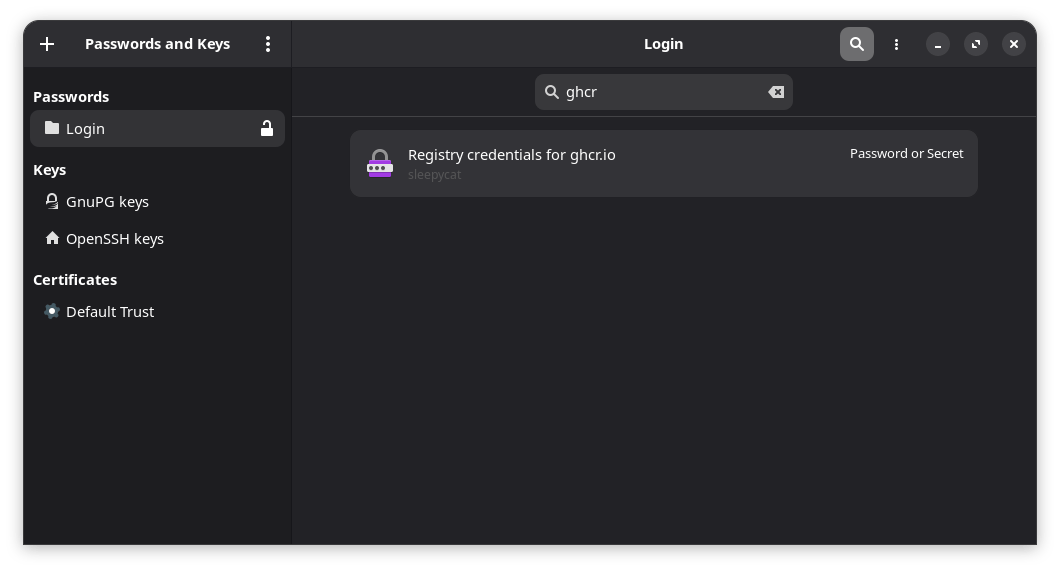
Using the secret service means the password is stored with our other credentials in secret service and accessible via the Passwords and Keys app (the GUI frontend for the Gnome Keyring service).
While we’ve avoided leaving unencrypted credentials lying around on disk, we’ve ended up running into the limitations of the Gnome Keyring security model; The user session is the trust boundary, and (all!) programs running within that boundary can access the credentials once the keyring is unlocked.
For a normal desktop user that might be a plausible security assumption, but as a developer, running untrusted code inside that session trust boundary is uncomfortably common.
This means that any malicious npm postinstall script can list my credentials and silently access my token(s) without me ever knowing.
$ docker-credential-secretservice list
{"Registry credentials for ghcr.io":"myuser"}
$ echo "ghcr.io" | docker-credential-secretservice get
{"ServerURL":"ghcr.io","Username":"myuser","Secret":"ghp_abc123YourActualPlaintextTokenHere"}
Safer development practices
Doing development inherently involves running some amount of untrusted code. While pass looks pretty great for mitigating some of the consequences, it’d be nice to address the root problem too.
The Canadian Government, despite some earnest attempts at Digital Transformation, feels stuck in a rut.
It’s my feeling that the root cause of that rut is there has been a paradigm shift that slid past unnoticed and the Government of Canada is now stuck because of it.
The two paradigms
There seems to be two basic paradigms for how organizations relate to technology each with a distinct org chart that implements that paradigm. While these are a bit of a caricature, they illustrate the idea.
The IT paradigm
The IT paradigm is focused on Information Technology Service Management (ITSM). It relies on cheap labor, expensive software, and manual workflows. In this model, IT revolves around a “help-desk” function where work is managed through tickets and “clicking next” on installation wizards.
Software in this paradigm is procured not built (“buy before build“), making cost control an organizational preoccupation, and adding a procurement process to every initiative. This approach makes the work of “IT” largely about the simpler acts of administering that software and supporting departmental users.
This paints a picture of an organization whose constituent parts are (roughly) a desktop team, a server team (to install the purchased software), the network team (so the desktops can talk to the servers), and a help-desk team to tie it all together.
The hands-on-keyboard technical work (white) is done by large numbers of people at the lowest rungs of the IT pay-scale (IT-01/02); they’re answering phone calls, manually adding new firewall rules, assigning software licenses, clicking new users into existence and closing help-desk tickets.
Implementing the IT paradigm: Technical work (white) is done at lowest rungs of the IT pay scale. IT-03 and above are all supervisory positions reducing technical work to a stepping stone.
With IT-01 and IT-02 positions given to people directly after graduation from school, and a rapid transition to management, the org chart demonstrates a view of technical work as a stepping stone to management rather than a career.
The technical depth of such an organization is essentially the time it takes to move from IT-01 to IT-03.
The engineering paradigm
Engineering organizations are almost the opposite: It uses expensive labour and free software to automate work. In this paradigm engineers create custom software using open-source tools so that entire workflows are not just automated, but automatic. In this model a single Full Time Employees (FTE) can automate away multiple FTEs worth of work.
IT-01s and 02s aren’t doing manual grunt work in this model; they write code and are surrounded by enough seniors to get the mentoring needed to become senior themselves.
Implementing the Engineering paradigm: Technical work (white) is a career path going all the way up to IT-05. The organization tilts towards senior to ensure quality and good mentoring for juniors.
Shopifys ChatOps, is a great example of this paradigm; They’ve replaced many things that previously required help-desk tickets with a Slackbot in a designated channel.
While the IT paradigm scales by “throwing bodies at the problem“, the Engineering paradigm makes workflows disappear into automation so that spikes in demand simply consume more CPU cycles.
The shift: Microsoft refocuses from IT to engineering
With those paradigms established, it’s possible to understand the shift:
In early 2000s, Microsoft sold a vision of the IT paradigm: all your organization needs is shrink-wrapped, one-size-fits-all software. They encouraged organizations to think of IT departments as a commoditized labor force whose only job was buying licenses and clicking on installation wizards.
But by the mid 2000s, the economic reality of tech shifted: For Microsoft renting access to software, infrastructure as “services” was far more lucrative than selling perpetual licenses.
This changed the labor equation entirely. Microsoft no longer wanted to be in the race-to-the-bottom market of cheap help-desk labor; they were now courting highly skilled engineers— captured in the (in)famous “developers, developers, developers” chant — to get them building high value systems on top of Azure’s cloud infrastructure: They were now pitching the Engineering paradigm.
The Corporate IT organizations who been built up around the IT paradigm, didn’t have “developers, developers, developers” and were unable to make the transition.
In an ironic twist, when Azure was bundled into existing enterprise licensing agreements, control of these new Engineering paradigm cloud services defaulted to the old IT paradigm groups that Microsoft had just pivoted away from.
Why we’re stuck: Cloud capture
This is the basic shape of the government’s IT problem; the tools needed for digital transformation are captured; locked away in a group that, by construction is not equipped to make effective use of them. The result: We’re stuck.
With industry on right side of this shift that means the industry “best practices” flowing downstream to the Government are all coming from the engineering paradigm (Zero Trust, devops, microservices, container orchestration, and Data Mesh, MLops, agentic AI). These practices are unimplementable by IT paradigm organizations (inside and outside government), leading to calls for everything from from re-invention to dissolution.
TBS themselves doesn’t seem to understand this dynamic. TBS has been steadily adding “best practices” into their policy (all from the engineering paradigm), and then seem mystified when it doesn’t work; in 2017 they flatly ordered departments to run applications in containers and build microservices as part of a big modernization push. Nothing happened.
Even when IT paradigm organizations can be forced to participate in these engineering paradigm best practices, things don’t turn out right; Corporate IT builds an “enterprise non-cloud” that systematically cancels out the clouds core value proposition, does a “lift and shift” of their workloads (which TBS then has to tell people not to do) and then dutifully creates a DevOps team (a well-known anti-pattern) which then goes on a procurement spree (Jfrog! Trivy! Cloudbees!) instead of using the cloud services they already have access to, while teams spin endlessly in the oval of enterprise sadness.
When teams elsewhere in the organization try to directly access the cloud tools Corporate IT controls, they can’t, or are only given a gimped version of them.
What now?
The argument here is essentially that the inability to recognize the paradigm you’re in makes you a prisoner of it. Being able to clearly think and talk about these paradigms is a big part of being able to solve the problem.
In general, the Government of Canada needs to realize the IT paradigm can’t get them where they need to go; We need to end the IT paradigm monopoly and invest in some engineering capacity.
Every one of these product teams represents something being pulled out of the IT paradigm and placed into the Engineering paradigm.
Another interesting possibility is to resolve the “cloud capture” problem the way Google has; by placing an engineering team in charge of cloud. Google has pioneered this as a concept they call SRE, and actually says the quiet part out loud:
SRE is fundamentally doing work that has historically been done by an operations team, but using engineers with software expertise, and banking on the fact that these engineers are inherently both predisposed to, and have the ability to, design and implement automation with software to replace human labor.
Both of these approaches would require some senior engineering talent to succeed, which loops us right back to the utility of being able to see and explain these paradigms; hiring senior technical positions is almost impossible because Human Resources staff across departments are enforcing bilingualism requirements on IT-03 and IT-04 positions based on the assumptions of the IT paradigm: only junior staff do technical work, and IT-03 and up is management.
Once again, the inability to recognize the paradigm makes you a prisoner.
Despite the Government of Canada having a web presence for 30 years now, one of the weirdly persistent problems when building government web applications is how to deal with logos.
The problem is with what is known as “signature blocks”; the combination of flag plus department name (or just “Government of Canada”) that you’ll find at the top of every website.
At first glance, it’s a solved problem, but if you look closely at one of these largely textual logos you’ll notice that it’s a picture: The logos all include an image of text rather than text itself, along with a flag.
Given that this is a well known accessibility problem, and doesn’t respect my choice of language (on the web I can specify my language, but the logo images always include both), and doesn’t work for mobile devices (including both languages isn’t good on a small screen)… it’s an odd pattern to see across every government site.
Why would anyone make a picture of text?
Because in 1970, the Federal Identity Program selected Helvetica as the official font of the Government of Canada. An eminently reasonable decision for the centralized team and world of print that existed at the time, this has caused major problems for generations of departmental web developers who then realize that as a commercial font Helvetica can’t legally be used without a license. Given the governments broken procurement process, and the insanity of trying to navigate it for each web application people have opted to simply take a picture of the text instead.
There have been a few “Helvetica clones” published over the years that allow us to do something reasonable for the web without messing with existing signage.
For our goal of visual compatibility with existing signage, one of the selection criteria is whether they preserve Helvetica’s distinctive “spur” on the capital G, something the words “Government of Canada” will make immediately noticeable. Overused Grotesk does this, and also stands out for having a web-friendly variable font version.
With font in hand, we can solve these accessibility and screen real-estate problems by using a proper font with Government branding.
To show how this can work, here is copy-paste friendly example of setting up Overused Grotesk in a new project so that it’s properly preloaded so that the page loads without the infamous Flash of Unstyled Text (FOUT).
Let’s use Rsbuild to scaffold a basic React application for us.
$ npm create rsbuild@latest

> npx
> create-rsbuild

◆  Create Rsbuild Project
│
◇ Project name or path
│  fontpreload
│
◇ Select framework
│  React 19
│
◇ Select language
│  TypeScript
│
◇ Select additional tools (Use <space> to select, <enter> to continue)
│  Add Biome for code linting and formatting
│
◇ Next steps ─────────────╮
│                          │
│  1. cd fontpreload       │
│  2. git init (optional)  │
│  3. npm install          │
│  4. npm run dev          │
│                          │
├──────────────────────────╯
│
└  All set, happy coding!
In this application we’ll need a copy of that Overused Grotesk font. We can use curl to both download the font put it in static/font which works nicely with Rsbuilds defaults.
Rsbuild’s default template doesn’t include a lang attribute on the <html> element, or a <meta> description, so we’ll add a minimalist template in the static folder too.
Now we’ll add some basic config for Rsbuild, telling it to use our template, skip bundling licence files, and most importantly to preload our font and other assets which is the key to avoid the Flash of Unstyled Text (FOUT).
patch rsbuild.config.ts <<'EOF'
diff --git a/rsbuild.config.ts b/rsbuild.config.ts
index c55b3e1..799d5ae 100644
--- a/rsbuild.config.ts
+++ b/rsbuild.config.ts
@@ -4,4 +4,29 @@ import { pluginReact } from '@rsbuild/plugin-react';
 // Docs: https://rsbuild.rs/config/
 export default defineConfig({
   plugins: [pluginReact()],
+  html: {
+    // use a custom template to address A11y and SEO issues.
+    template: "./static/index.html",
+    tags: [
+      {
+        tag: 'link',
+        attrs: {
+          rel: 'preload',
+          type: 'font/woff2',
+          as: 'font',
+          href: '/static/font/OverusedGrotesk-VF.woff2',
+          crossorigin: 'anonymous',
+        },
+      },
+    ],
+  },
+  output: {
+    // This will prevent .LICENSE.txt files from being generated
+    legalComments: "none",
+    filename: {
+      // Don't use a hash in the font filename, so our tags above can
+      // reference the font files directly.
+      font: "[name][ext]",
+    },
+  },
 });
EOF
Now we include an @font-face rule specifying where we want to load our font from. Rsbuild will run rspack on this file which will normally rewrite the src to point to the bundled file (something like src: url(/static/font/OverusedGrotesk-VF.1656e9bd.woff2)format("woff2");). Including filename.font: "[name][ext]", ensures that it doesn’t add that hash, so the name lines up with the name in our href in the tags section.
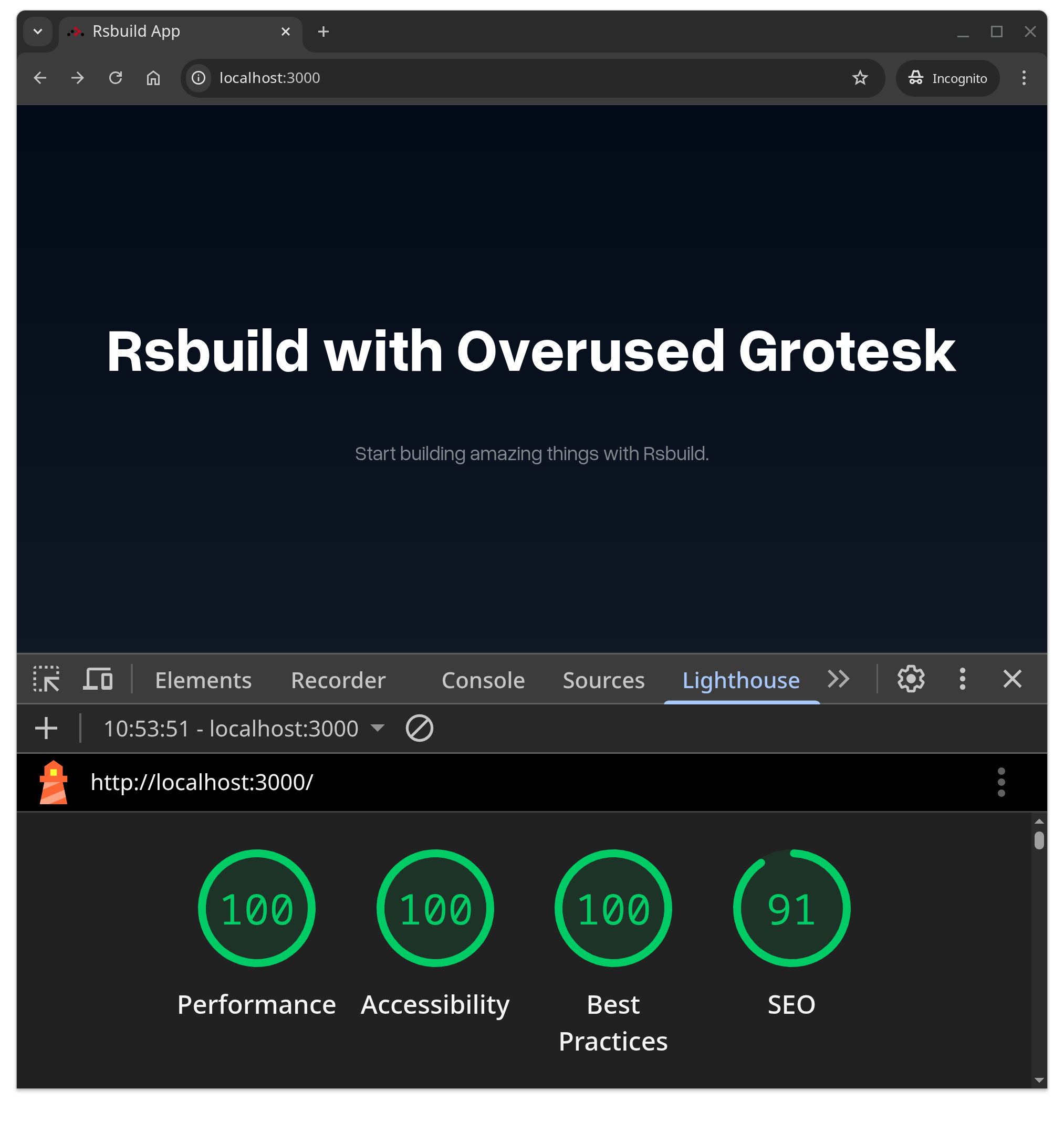
To get a sense of what this will look like in production, use npm run preview to get Rsbuild to serve us the production build files it just created in the dist folder. The Lighthouse scores are telling us we did this right.
This is pretty good so far. We have a font, and we’re loading it in a way that is good for web performance, but we haven’t really solved the larger problem with logos until we take one final step and make a signature block that uses it.
First, we’ll need to create a React component representing the Canadian flag. You might notice this component is created as a headless component, so that it’s easy to add ARIA attributes (important for accessibility) to and plays nicely with whatever approach you’re using for CSS (something like PandaCSS or Tailwind)
And finally we’ll import that into our App component to create a our new signature block. Notice how we can add styles and ARIA attributes as needed, without worrying about a customizability wall.
The result is super satisfying, a razor-sharp and accessible signature block looks great at any zoom level and on any screen size. It’s easily styled, and works really well with internationalization libraries like the one I covered in a previous post.
Using an Open Source font to maintain visual compatibility with FIP feels like win-win: Nobody needs to change physical signage/letterhead, lingering accessibility problems can be solved and the user experience for every government web site improves a little… all for a cost of $0.
“Build vs buy” is presented as a fundamental binary choice that organizations must make as part of their “due diligence” around technology projects.
Here in 2025, this idea is suffering from “concept drift” that makes its simplistic dichotomy a dangerous one, especially for governments.
The Build option
The first problem with “build vs buy” is that “build” doesn’t mean what it used to.
In the past decade or two Open Source Software has “won” and in doing so, fundamentally changed what “building” means. 40 years ago “build” meant tonnes of first-of-it’s kind software painstakingly written in low-level languages, but these days programmers are building with bricks not sand.
Back in 2018 Laurie Voss, the co-founder of the npm package registry captured this shift when he did some analysis showing that 97% of code in modern applications comes from npm. Buy pulling and assembling these packages developers are able to write just the last 3% of the code needed to connect everything together while generating 100% of the value.
The big idea here is that applications are now composed or assembled like a prefab house rather than built from scratch. While prefab components are recognized as a way to mitigate risk in construction, senior executives “limited exposure and experience with information technology projects” (OAG report pg 10) has meant that no such acknowledgement has happened above the working level of the Canadian government.
Without that acknowledgement, while web applications only take a couple of months to build (even for teams in the government!) the “risk management” process around them continues to look like the Manhattan project: budgets in the millions and multi-year, multi-year PowerPoint-driven gated processes full of earnest “go/no-go” decisions, tonnes of scope-creep to “align” with tech decisions past and present, HIPPO effects and a mandatory 8+ month compliance audit.
With the “risk management” process itself adding more cost, time and risk to software projects than the actual software, the “build” option continues to be an option of last resort in spite of an $8.8 trillion ecosystem of open source components readily available.
While the executive class in the Canadian government largely has no idea about this shift from custom code to composition, private industry is well aware of it. This adds a frustrating twist to the “build vs buy” conversation: Executives often avoid “build” because of perceived risk, forbidding employees to assemble the Open Source components themselves in favour of contractors who then assemble the same components for 60% more cost.
This ends up meaning that the “build vs buy” is no longer about “open source vs closed source”, it’s about which organization the skills to competently navigate the Open Source Ecosystem will exist in.
The buy option
As Thoughtworks points out, “a commodity capability will be provided under the assumption that you will adapt your processes to that particular vendor’s definition of industry ‘best practice’”, but the core function of government – governing – is inherently unique to each nation.
With 5,162 municipalities in Canada, this is a big enough customer base that competitive markets can emerge, driving down costs, preventing capture and spreading the “best practices” that software embeds. This is the world the “buy” option is intended to be exercised in.
Where “buy” breaks down
At the Federal level its more complicated. Federal governments are unique in the literal sense; there is only one per country. Each is shaped by a set of laws and policies unique to that countries historical and political context. Software that implements federal “business logic” will have a market of one (a competitive market can’t be created) which suggests that in general, you’d expect to find more custom software at the federal level.
This doesn’t mean “buy” is off the table; Technically savvy governments are able square their unique needs with the imperative to support the free market by breaking down large systems full of custom logic into smaller components, finding generic ones like like sending an email, authenticating users, or managing a wait queue that can easily adapt to a vendors definition of ‘best practice’ and buying those. Commercial cloud providers provide hundreds of commodity services at exactly this level of granularity to allow for this. Again the result is a “composed” system; some amount of custom logic and whatever code is needed to integrate some number of third party services.
It’s unfortunately common in the Canadian federal government that executives don’t think about systems a granular enough level, and often insist on the “buy” option for entire systems, even in the face of unique requirements and processes it either can’t or won’t adapt.
From the looks of it, we have a complex, unique need that requires custom software , but the government has neither the skills to build it, nor the skills to contract it out.
Somewhat unsurprisingly, the skills needed to build and the skills needed to contract it out are related, and over-use of the “buy” option may well be eroding both.
Some years ago, Dell began outsourcing manufacturing to a Taiwanese electronics manufacturer, ASUSTek. The outsourcing started with simple circuit boards, then the motherboard, then the assembly of the computer, then the management of the supply chain and finally the design of the entire computer.
…
The end result? ASUSTeK became Dell’s formidable competitor, while Dell itself, apart from its brand, was hardly more than a shell, without any real expertise to run or grow its business.
NASA recently published “NASA at a Crossroads” talking about some of it’s struggles with the deskilling effects of outsourcing. They write of one contract that “In this case, NASA is more of a contract monitor than a technical organization capable of taking humanity into the solar system”, and explain that generally over-use of contracting will “erode the agency’s in-house capabilities”.
Connecting the dots, NASA points out that doing so also effects their contracting ability, and ultimately their mission: “the concern is not only an erosion of “smart-buyer” capability but also of the capacity to invent and innovate”. Anyone who has worked in the Canadian Government will likely recognize that state.
Meanwhile at Canada’s Treasury Board, the 2023 cloud strategy principle #5 is still pushing outsourcing by Prioritizing “buy before build”, thus deskilling their staff (turning them into “contract monitors”), while principle #6 says they want to re-skill staff seemingly without ever wondering why they need to do that.
With the need to form coherent regulations on technical topics like AI, cyberwarfare, crypto-currencies, ransomware, along with a burning need to address the aging IT infrastructure that was identified 24 years ago… there is a deep need in government for technical expertise.
The underlying problem here isn’t buying things, it’s that losing touch with the technical skills needed to build things is setting the stage for both internal facing disasters like Phoenix and outward facing ones, in the form of poor service delivery and ignorant and damaging regulation that makes things worse for business.
Why rehash this now?
The fundamentals of governing depend on basic capabilities like being able pay the public service, or safeguard citizens data. Doing these things increasingly requires things government can’t buy, thus requiring a builders skill set.
Without a product to buy, it is going to take a builders skill set to consistently interpret and implement Zero Trust principles across all architectural layers in a complex environment full of legacy systems.
After years of outsourcing and deskilling it’s unclear that the Canadian Government is capable of implementing this security model (especially when each pillar is assigned matrix-style to a different group with differing priorities and wildly different levels of technical skills).
Without it, the government’s ability to protect it’s citizens data is suspect, and the willingness for allies to share data with Canada will steadily decrease as Canada fails to implement what they now consider “basic cyber hygiene“, all of which threatens the basic functioning of government.
From build last to something new
The old “build vs buy” debate needs an update. Beyond the basic observation that folks responsible for IT projects should have actual skills in this area, people in government need to wrap their heads around how the two sides of this little dichotomy have shifted if they want better outcomes.
On the “build” side, the time and cost involved are a fraction of what they were, the risk management process doesn’t reflect it. The inability to automate key services causes political crises, and the inability to implement key enabling architectures like Data Mesh and Zero Trust (neither of which can be purchased) setting us up for future crises. Weighing “build” against “buy” without considering how “build” is entwined with these broader issues is damaging.
On the “buy” side, granular services now exist that can allow smart use of commodity components inside larger custom software efforts, but techniques that would help like Wardley mapping are basically unheard-of in the Canadian Government. Using those techniques to safely outsource commodity capabilities also requires a builders skill set.
While there are legitimate moments for the “build vs buy” question, without knowing how things are actually built, having the capability to actually pull it off and the consequences of too much buying, this discussion is just faux diligence that does more harm than good.
TBS’s current “buy before build” mandate makes building an act of last resort, suppressing that critical skill set when it’s needed most.
Instead of “buy before build” we probably need to remember what NASA’s Wernher von Braun had figured out in 1964:
“A good engineer gets stale very fast if he doesn’t keep his hands dirty . . . it is for this reason that we are spending about 10 percent of our money in-house; it enables us to really talk competently about what we are doing. This is the only way known to us to retain professional respect on the part of our contractors.”
We managed to get from “cloud first” to “cloud smart“. Maybe something like “build smart, buy smart” is possible too.
Two projects that caught my eye are the Rust-based rewrite of Webpack called Rspack, and it’s Create React App equivalent companion project Rsbuild. Of course here in Canada I’m going to want that along with proper internationalization (i18n) using my favourite library Lingui.
With Rsbuild creating a minimalistic Single Page Application pre-configured with the Rspack bundler, and both Lingui and Rspack working with the rust-based transpiler SWC (a faster equivalent of Babel) these actually work together nicely and are my new favorite way to start a project.
What follows is a cut-and-paste friendly walk-though to get translations working.
We’ll use the command npm create rsbuild@latest to create our project skeleton.
$ npm create rsbuild@latest

> npx
> create-rsbuild


◆  Create Rsbuild Project
│
◇  Project name or path
│  lingui-demo
│
◇  Select framework
│  React 19
│
◇  Select language
│  JavaScript
│
◇  Select additional tools (Use <space> to select, <enter> to continue)
│  Add Biome for code linting and formatting
│
◇  Next steps ─────────────╮
│                          │
│  1. cd lingui-demo       │
│  2. git init (optional)  │
│  3. npm install          │
│  4. npm run dev          │
│                          │
├──────────────────────────╯
│
└  All set, happy coding!
Using fd the modern (and git aware) equivalent of find we can see that the structure of this project is nice and simple: 2 JS files and a bit of CSS along with 3 config files and a readme.
And now we’ll connect the dots by adding some SWC config to our rsbuild.config.mjs file. The idea is that rsbuild will pass this through to rspack, so that its built-in swc-loader is properly configured with Lingui’s @lingui/swc-plugin
Now we need two things that don’t exist yet: a function to dynamically load the locales (borrowing heavily from the one in their documentation) and some buttons that would let us switch languages.
We’ll mark the default text in the src/App.jsx for translation and pull in that <LocaleSwitcher/> component so we can see this thing working.
patch src/App.jsx <<'EOF'
diff --git a/src/App.jsx b/src/App.jsx
index dff1751..629fab9 100644
--- a/src/App.jsx
+++ b/src/App.jsx
@@ -1,10 +1,18 @@
+import React from 'react';
+import { Trans } from '@lingui/react/macro';
+import LocaleSwitcher from './LocaleSwitcher.jsx';
 import './App.css';

 const App = () => {
   return (
     <div className="content">
-      <h1>Rsbuild with React</h1>
-      <p>Start building amazing things with Rsbuild.</p>
+      <LocaleSwitcher />
+      <h1>
+        <Trans>Rsbuild with React</Trans>
+      </h1>
+      <p>
+        <Trans>Start building amazing things with Rsbuild.</Trans>
+      </p>
     </div>
   );
 };
EOF
With the setup out of the way, we’ll use the lingui extract command to comb through our code for translatable strings and write them into the translation files. Notice it even tells us that we’re missing some translations!
$ npm run extract

> lingui-demo@1.0.0 extract
> lingui extract

✔
Catalog statistics for src/locales/{locale}/messages:
┌─────────────┬─────────────┬─────────┐
│ Language    │ Total count │ Missing │
├─────────────┼─────────────┼─────────┤
│ fr          │      2      │    2    │
│ en (source) │      2      │    -    │
└─────────────┴─────────────┴─────────┘
That extract command will extract all the strings marked as translatable with the <Trans> component into the .po files in the locales directory. Then we’ll update the non-default translation file in src/locales/fr/messages.po with the translated text.
patch src/locales/fr/messages.po <<'EOF'
diff --git a/src/locales/fr/messages.po b/src/locales/fr/messages.po
index 0c52442..f7dabe8 100644
--- a/src/locales/fr/messages.po
+++ b/src/locales/fr/messages.po
@@ -15,8 +15,8 @@ msgstr ""

 #: src/App.jsx:11
 msgid "Rsbuild with React"
-msgstr ""
+msgstr "Rsbuild avec React"

 #: src/App.jsx:14
 msgid "Start building amazing things with Rsbuild."
-msgstr ""
+msgstr "Commencez à créer des choses incroyables avec Rsbuild."
EOF
Don’t forget to run npm run compile to get those strings ready for use in your app. After that, run npm run dev to admire your freshly internationalized application!
Enterprise architecture (EA) is a troublesome discipline. I think it’s fair to argue that the famous Bezos API mandate and the birth of AWS are both essentially enterprise architecture efforts as is Simian Army from Netflix. These efforts have clearly delivered a huge positive business impact, but it’s much harder to make that case for the version of EA that exists in government.
For this government version, if we look beyond the tendencies towards self-referential documentation, and the use of frameworks that lack empirical grounding, there is an increasingly visible conflict with a growing body of knowledge about risk and resilience that is worth considering.
EA is used to design a target architecture, but more people are familiar with it as a project gating mechanism where the pressure to “align” is applied to projects. Mostly this takes the form of EA arguing for centralization and deduplication largely justified in terms of imagined cost savings (despite the fact that the combination of virtualization and usage-based billing has largely eliminated the benefits of shared infrastructure).
This focus stands in sharp contrast with the literature on resilience, which largely views this sort of cost-optimization activity as stripping a system of it’s adaptive capacity.
What’s common to all of these approaches- robustness, redundancy, and resilience, especially through diversity and decentralization- is that they are not efficient. Making systems resilient is fundamentally at odds with optimization, because optimizing a system means taking out any slack.
The Government of Canada has ~208 Departments and Agencies, 86 of which have their own accounts. This is often held up as an example of of inefficiency and duplication, and the kind of thing that EA exists to fix. As TBS describes: “Sign‑in Canada is a proposal for a unified authentication mechanism for all government digital engagement with citizens.”
If you skip past the meetings required to get all 86 systems to use Sign-in-Canada, the end result would be a “star graph” style architecture; Sign-in-Canada in the center, with digital services connecting to it.
A “star graph”. Imagine the central point as a central sign-in service, or some other shared resource (maybe a shared drive, or a firewall) with other users/systems connecting to it.
Prized for efficiency and especially for central control this star-graph style architecture shows up everywhere in governments. To get to this architecture, EA practitioners apply steady pressure in those meetings (those gating functions of Enterprise Architecture Review Boards) to avoid new sign-in systems and ensure new and existing systems connect to/leverage Sign-in-Canada.
In graph theory there is a term for networks that are formed under such conditions; “preferential attachment“, where new “nodes” in the network attach to existing popular nodes.
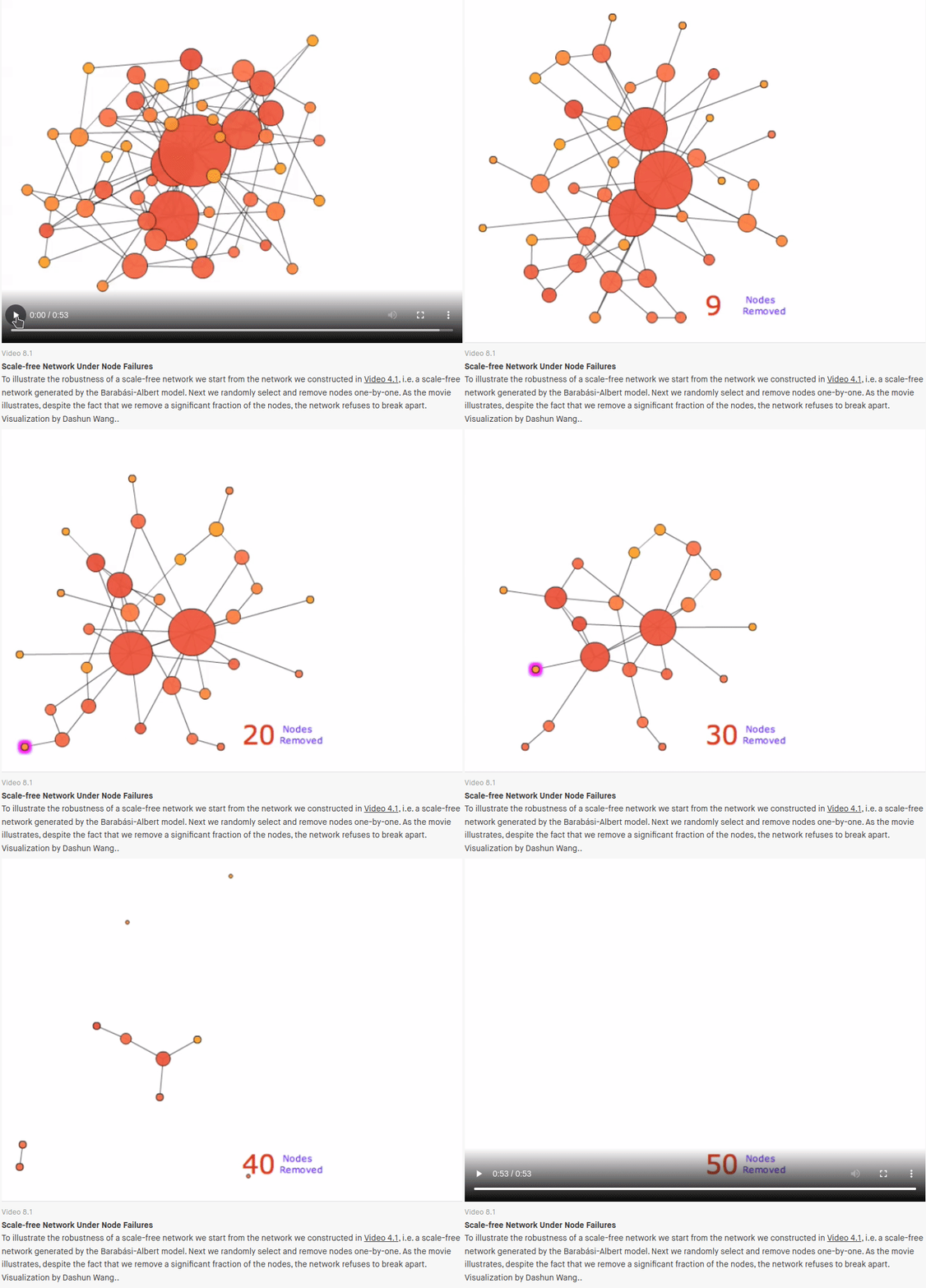
Networks formed under a preferential attachment model (called “scale-free” in the literature) have some really interesting (and well studied) properties that I think are exactly what EA is trying to encourage; networks formed like this are surprisingly robust to random failures.
If you imagine the power/cooling/rack space constraints of a traditional physical data center, and the challenge of staying within those limits while limiting the effects of random failures, the centralization/deduplication focus of EA is a huge benefit.
A demonstration from the online Network Science textbook of how scale free networks are surprisingly difficult to destroy by randomly removing nodes.
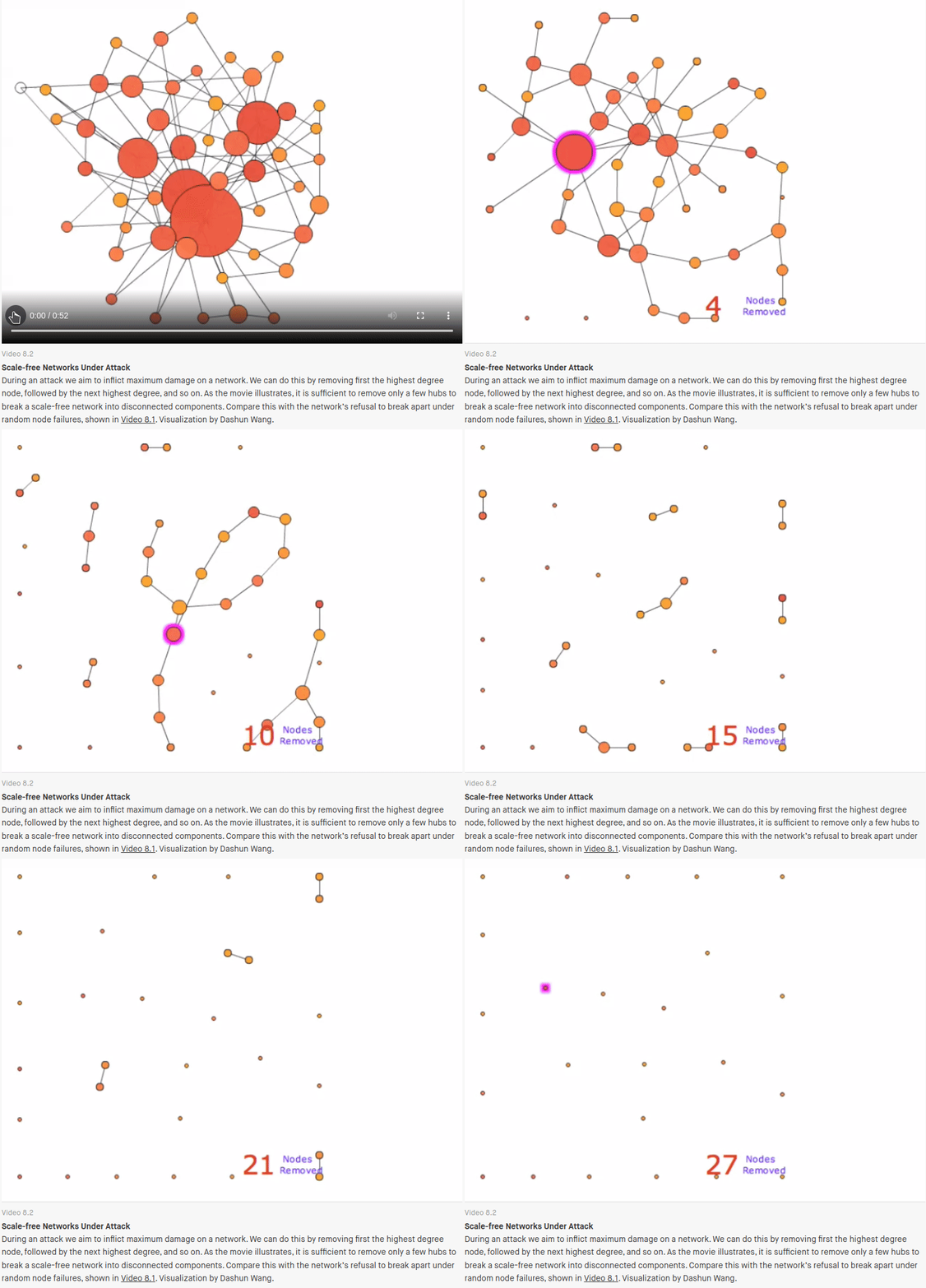
But “scale-free” networks also have another property: They are very fragile to targeted attack. Only a handful of highly connected nodes need to be removed before the network is completely destroyed. If targeted attacks are suddenly the concern, the preferential attachment playbook, starts to look like a problem rather than a solution.
A demonstration from the Network Science textbook showing how specifically targeting central nodes quickly destroys a scale-free network.
It’s these ideas that show why an EA practice narrowly focused on reuse/centralization/deduplication ends up conflicting with resilience engineering and modern security architecture.
Through that resilience lens, the success of Sign-in-Canada means a successful hack (the Okta breach gives us a preview) could paralyze 86 government organizations, something that isn’t currently possible given the redundancy of our current “inefficient” system.
In academic terms what we’ve done is increase our systems “fragility”, it’s a well known byproduct of the kinds of optimizations that EA is tasked with making.
We need to understand that this mechanistic goal of optimization as creating this terrible fragility and that we need to try and think about how we can mitigate against this.
These system/network properties are well known enough that the US military has developed an algorithm that will induce fragility in human organizations. It uses this to make networks (terror networks in their case) more vulnerable to targeted attack.
The algorithm is called “greedy fragile” and it works by selecting nodes for “removal” via “shaping operations” (you can imagine what removing someone from a social network means in a military context), so that the resulting network is more centralized (“star-like”) and fragile; centralizing as a way maximize the impact of a future attack.
Explaining the goal of military “shaping operations”, to make a network more “star-like” and fragile.
While it might sound uncharitable to lay the responsibility for systemic fragility at the feet of enterprise architecture it is literally the mandate of these groups to identify and make many of these optimizations happen. It’s worth saying the executives fixated on centralization and security’s penchant for highly centralized security “solutions” are big contributors too.
I would argue the 2022 hack of Global Affairs which brought down the entire department for over a month is an example of of this fragility. When an entire department can fail as a single unit, this is an architectural failure as much as it is a security failure; one that says a lot about the level of centralization involved.
It’s worth saying that architecting for resilience definitely still counts as “enterprise architecture”, and in that way I think EA is actually more important than ever. However as pointed out in How infrastructure Works, it would be a big shift from current practice.
“Designing infrastructural systems for resilience rather than optimizing them for and efficiency is an epistemological shift”
We very much need EA teams (and security architecture teams) to make that shift to assuming targeted attacks and focusing on resilience. The EA folks I’ve met are brilliant analysts and more than capable of updating their playbooks with ideas from complex systems, cell-based architecture, resilience patterns like the bulkhead pattern, chaos engineering, or Team-Topologies and using them to build more resilient architectures at every level: both system and organizational.
With Global Affairs, FINTRAC and RCMP all hit within a few weeks of each other here in early 2024, making resilience a priority across the government is crucial and there is nobody better placed to do that than enterprise architects.
With the resignation of the CIO of the Government of Canada, the person placed at the top of the Canadian public service to fix the existing approach to IT, there is lots of discussion about what’s broken and how to fix it.
Across these discussions, one thing stands out to me: IT security always seems to get a pass in discussions of fixing/modernising IT.
This post is an attempt to fix that.
As the article about the CIO points out, “All policies and programs today depend on technology”. IT Security’s Security Assessment and Authorization (SA&A) process applies to all IT systems therefore landing on the critical path of “all policies and programs”. This one process adds a 6-24 month delay to every initiative and somehow escapes any notice or criticism at all.
If you imagine some policy research, maybe a public consultation and then implementation work, plus 6-24 months caught in the SA&A process, it should be clear that a single term in office may not be enough be able to craft and launch certain initiatives let alone see benefits from them while in office. Hopefully all political parties can agree fixing this is in their best interests.
As a pure audit process, the SA&A is divorced from the technical work of securing systems (strangely done by operations groups or developers, rather than by security groups) leaving lots of room to reshape (or eliminate) this process without threatening actual security work. Improvements in this process are probably the single most impactful change that can be made in government.
It’s also key to accelerating all other modernisation initiatives.
Everyone in Ottawa is well aware that within each department lies one or more likely political-career-ending ticking legacy IT timebombs. Whether this is the the failure of the system itself, or of the initiative launched to fix it, or even just the political fallout from fixed capacity systems failing to handle a surge in demand, every department has these and the only question is who will be in office when it happens.
Though you’d never guess, inside the government it is actually known how to build systems that can be modernised incrementally, changed quickly, rarely have user visible downtime and can expand to handle the waves of traffic without falling over.
The architecture that allows this (known as microservices) was made mandatory by TBS in the 2017 Directive on Service and Digital. The Directives successor (the Enterprise Architecture Framework) doesn’t use the term directly but requires that developers “design systems as highly modular and loosely coupled services” and several other hallmarks of microservices architecture that allow for building resilient digital services.
I think TBS was correct in it’s assessment that this architecture is key to many modernisation initiatives and avoiding legacy system replacements just as inflexible as their predecessors. Treasury Board themselves describes the difference between current practice as their target architecture as a “major shift” but the number of departments willing/able to make that shift hovers close to zero.
AWS uses the same microservices architecture to deliver their digital services and promotes it, along with the infrastructure and team structures needed to support it, under the banner “Modern Applications“. Substantially similar advice is given by Google and others and these best practices have been worked into TBS’s policy since 2017.
While TBS might want departments to adopt microservices (created circa 2010 around the “death” of SOA), it’s the 1990s-era 3-tier architecture (what ITSG-38still calls the “preferred architecture”) that the network and security infrastructure is set up to support, rather than the fancy compute clusters and cloud functions needed for the microservices architecture; an application architecture that exists to fix the veryvisibleproblems governments (and others) have with availability and scalability.
Unfortunately, these legacy design patterns mean that security teams spend months or years building out a digital copy of a legacy Data centre in the cloud. These come with complex routing and subnets with a fixed-capacity Virtual Machine based security appliance at the center.
Beyond the staggering delay, the result is an anti-pattern where the network layer cancels out the scalability and availability benefits of the application architecture above and the cloud architecture below.
These fixed-capacity virtual appliances can’t handle waves of traffic or scale to zero like AWS Lambda or Google Cloud Run, and the work that TBS is hoping will go into creating those high-availability microservices just won’t matter when security brings down the firewall in front to patch it.
While TBS has updated it’s policy to require agile development practices, ITSG-33, the foundation of all government security process is explicitly waterfall, and while adapting it to agile is theoretically possible, it’s developers that get exposure to agile methods, rather than the well intentioned auditors and former network admins that populate most security groups.
Beyond the shift to agile, the division of labour (the split between dev/sec/ops) systemically undermines ITSG-33’s approach: the technical work of securing systems builds security engineering expertise in operations groups, while the spreadsheet-based audit work of security teams chases away technical talent and steadily erodes any remaining technical capacity.
This dynamic reliably creates a skills imbalance that undermines the audit/watchdog role ITSG-33 imagines for security teams; The 2019 State of DevOps report noted a similar effect with CoEs: “This disconnect between theory and hands-on practice will eventually threaten their expertise”. Luck and smart hiring can help, but security teams are forever swimming against this current. When you mix security and compliance, what survives is compliance.
The failure case is the familiar security-theater of the audit process: non-technical auditors “verifying” the work of developers and operations via screenshots without being able to read or run code and executives placing their faith in this paperwork rather than the judgement of the dev/ops teams doing the engineering work of securing systems.
Typically contractor driven, each one costs over $70,000 and at least 6 months for a paper audit of a simplistic one-piece monolithic application. Nobody is sure how to apply this process to the microservices architecture TBS is pushing where each application is made of dozens, or even thousands of separate applications.
This process is almost single-handedly responsible for the lack of progress on modernisation: Since all departments have hundreds of applications, assuming an optimistic audit timeline of 6 months each, even the most milquetoast modernization effort implies a SA&A/audit process bottleneck measured in decades.
Surrounded by hollowed-out waterfall security processes and pre-cloud security architecture that no-one seems equipped to change, Treasury Board’s vision of the government delivering modern, reliable digital services flounders.
The idea here is that in many cases modernising security is a precondition to successfully modernising anything else. For those that overlook security, the assumptions embedded in their tools, processes and architectures will subtly but steadily undermine their efforts. Treasury Board is filled with smart policy analysts learning this the hard way.
Security is the base of the modernisation pyramid… start there to fix things.
The key file in that repo is the kustomization.yaml file. Kube-ArangoDB installs into the default namespace, so we’re using kustomize’s namespace option to ensure that everything ends up in the db namespace.
The main event is the resources: we’re pulling Kube-ArangoDB directly from GitHub and adding two files of our own.
The in the replicas section we’re just saying to run only a single instance of the various operators (since we’re running a single instance of the database).
And finally, we’re saying a secret called arangodb from a .env file.
In the secretGenerator section, we told Kustomize to expect a .env file in the directory, so we should create that next. The values in that file will be used as the credentials for the root user.
You can watch the creation of the pods and pvc, and when it looks like this, you’ll know it’s ready.
$ kubectl get po,pvc -n db
NAME                                                          READY   STATUS    RESTARTS   AGE
pod/arango-deployment-operator-7c54bb947-67qdn                1/1     Running   0          3m49s
pod/arango-deployment-replication-operator-558b49f785-k99hf   1/1     Running   0          3m49s
pod/arango-storage-operator-68fb5f6949-zzf4c                  1/1     Running   0          3m49s
pod/arangodb-sngl-miotcqdv-435cf0                             2/2     Running   0          3m9s

NAME                                             STATUS   VOLUME                                     CAPACITY   ACCESS MODES   STORAGECLASS   AGE
persistentvolumeclaim/arangodb-single-miotcqdv   Bound    pvc-71fee7f0-2387-4985-a551-a79ab8671a34   10Gi       RWO            standard       3m9s
With that running, you can connect to the admin interface by forwarding the ports to your local machine. The name of the pod will be different for you.
kubectl port-forward -n db svc/arangodb 8529:8529
Forwarding from 127.0.0.1:8529 -> 8529
Forwarding from [::1]:8529 -> 8529
With that you should be able to connect to localhost:8529, with the credentials you gave above.
That was easy
I didn’t find Kube-ArangoDB super approachable at first. After piecing a few things together and a few reps, I’m really impressed with the how easy it is to get my favourite database up and running in Kubernetes.
Lots has been written about how Docker combines linux kernel features like namespaces and cgroups to isolate processes. One overlooked kernel feature that I find really interesting is Overlay FS.
Overlay FS was built into the kernel back in 2014, and provides a way to “present a filesystem which is the result over overlaying one filesystem on top of the other.”
To explore what this means, lets create some files and folders to experiment with.
$ for i in a b c; do mkdir "$i" && touch "$i/$i.txt"; done
$ mkdir merged
$ tree
.
├── a
│   └── a.txt
├── b
│   └── b.txt
├── c
│   └── c.txt
└── merged

4 directories, 3 files
At this point we can use Overlay FS to overlay the contents of a, b and c and mount the result in the merged folder.
$ sudo mount -t overlay -o lowerdir=a:b:c none merged
$ tree
.
├── a
│   └── a.txt
├── b
│   └── b.txt
├── c
│   └── c.txt
└── merged
    ├── a.txt
    ├── b.txt
    └── c.txt

4 directories, 6 files
$ sudo umount merged
With merged containing the union of a,b and c suddenly the name “union mount” makes a lot of sense.
If you try to write to the files in our union mount, you will discover they are not writable.
$ echo a > merged/a.txt
bash: merged/a.txt: Read-only file system
To make them writable, we will need to provide an “upper” directory, and an empty scratch directory called a “working” directory. We’ll use c as our writable upper directory.
$ mkdir working
$ sudo mount -t overlay -o lowerdir=a:b,upperdir=c,workdir=working none merged
When we write to a file in one of the lower directories, it is copied into a new file in the upper directory. Writing to merged/a.txt creates a new file with a different inode than a/a.txt in the upper directory.
$ tree
.
├── a
│   └── a.txt
├── b
│   └── b.txt
├── c
│   └── c.txt
├── merged
│   ├── a.txt
│   ├── b.txt
│   └── c.txt
└── working
    └── work [error opening dir]

6 directories, 6 files
$ echo a > merged/a.txt
$ tree --inodes
.
├── [34214129]  a
│   └── [34214130]  a.txt
├── [34217380]  b
│   └── [34217392]  b.txt
├── [34217393]  c
│   ├── [34737071]  a.txt
│   └── [34211503]  c.txt
├── [34217393]  merged
│   ├── [34214130]  a.txt
│   ├── [34217392]  b.txt
│   └── [34211503]  c.txt
└── [34737069]  working
    └── [34737070]  work [error opening dir]

6 directories, 7 files
Writing to merged/c.txt modifies the file directly, since c is our writable upper directory.
$ echo c > merged/c.txt
$ tree --inodes
.
├── [34214129]  a
│   └── [34214130]  a.txt
├── [34217380]  b
│   └── [34217392]  b.txt
├── [34217393]  c
│   ├── [34737071]  a.txt
│   └── [34211503]  c.txt
├── [34217393]  merged
│   ├── [34214130]  a.txt
│   ├── [34217392]  b.txt
│   └── [34211503]  c.txt
└── [34737069]  working
    └── [34737070]  work [error opening dir]

6 directories, 7 files
After a little fooling around with Overlay FS, the GraphDriver output from docker inspect starts looking pretty familiar.
We can use these like Docker does to mount the file system for the node:alpine image into our merged directory, and then take a peek to see the nodejs binary that image includes.
From there we could do a partial version of what Docker does for us, using the unshare command to give a process it’s own mount namespace and chroot it to the merged folder. With our merged directory as it’s root, running ls /usr/local/bin command should give us those node binaries again.
Seeing Overlay FS and Docker’s usage of it has really helped flesh out my mental model of containers. Watching docker pull download layer after layer has taken on a whole new significance.
If you are working with Kubernetes, it’s pretty important to be able to generate variations of your configuration. Your production cluster probably has TLS settings that won’t make sense in while testing locally in Minikube, or you’ll have service types that should be NodePort here and LoadBalancer there.
While tools like Helm tackle this problem with PHP style templates, kustomize offers a different approach based on constructing config via composition.
With each piece of Kubernetes config uniquely identified, composite key style, through a combination of kind, apiVersion and metadata.name, kustomize can generate new config by patching one yaml with others.
This project is using kustomize. The folder structure suggests that there is some base configuration, and variations for GKE and Minikube. We can generate the Minikube version with kubectl kustomize overlays/minikube.
This actually shows one of the nice things about kustomize, you probably already have it, since it was built into the kubectl command in version 1.14 after a brief kerfuffle.
If you want to get this config into your GKE cluster, it would be as simple as kubectl apply -k overlays/gke.
This tiny example obscures one of the other benefits of kustomize: it sorts the configuration it outputs in the following order to avoid dependency problems:
Namespace
StorageClass
CustomResourceDefinition
MutatingWebhookConfiguration
ServiceAccount
PodSecurityPolicy
Role
ClusterRole
RoleBinding
ClusterRoleBinding
ConfigMap
Secret
Service
LimitRange
Deployment
StatefulSet
CronJob
PodDisruptionBudget
Because it sorts it’s output this way, kustomize makes it far less error prone to get your application up and running.
Setting up your project to use kustomize
To get your project set up with kustomize, you will want a little more than the functionality built into kubectl. There are a few ways to install kustomize, put I think the easiest (assuming you have Go on your system) is go get:
go get sigs.k8s.io/kustomize
With that installed, we can create some folders and use the fd command to give us the lay of the land.
$ mkdir -p {base,overlays/{gke,minikube}}
$ fd
base
overlays
overlays/gke
overlays/minikube
In the base folder we’ll need to create a kustomization file some config. Then we tell kustomize to add the config as resources to be patched.
The kustomize edit series of commands (add, fix, remove, set) all exist to modify the kustomization.yaml file.
You can see that kustomize edit add resource helloworld-* added a resources: key with an array of explicit references rather than an implicit file glob.
Worth noting is the base folder where kustomize will look for the bases to apply the patches to. The resulting kustomization.yaml file looks like the following:
It won't surprise you that what you see here is just scratching the surface. There are many more fields that are possible in a kustomization.yaml file, and nuance in what should go in which file given that kustomize only allows addition not removal.
The approach kustomize is pursuing feels really novel in a field that has been dominated by DSLs (which hide the underlying construct) and templating (with the dangers of embedded languages and concatenating strings).
Working this way really helps deliver on the promise of portability made by Kubernetes; Thanks to kustomize, you’re only a few files and a `kustomize build` away from replatforming if you need to.